Building Revenue Snapshots and custom company card in a multi-brand HubSpot portal for client growth and visibility
This is a fun project I worked on as part of exploring the HubSpot developer MCP and Gemini CLI and built as part of the HubSpot Ecosystem Mentorship Program’s Mini-cohort on the topic of the Developer MCP.
I had great input from my mentor Silvana Vasqéz Sutcliffe on the n8n automations, and coaching on the technical limits (and simplifying the flows) with my first planned solution from my non-official mentor and friend Mike Thomas.
What I set out to build and what I ended up with are two rather different products, so I’ll stick to what I currently have as a live, working, version and skip the messy middle-bit of changing course and figuring out the final shape.
What I’ll build: UI extension, custom object and n8n automation
The core issue I was solving for was keeping track of revenue across multiple clients and brands. The portal in question has several agencies working with the same database but in different pipelines.
Agency A needed a way to track and see growth YoY that wasn’t mixing with numbers for Agency B. Each agency might also have different growth goals for individual clients/account, eg. 10% growth across target accounts but a more modest 2-3% for established clients.
Setting up properties for all agencies (x7 different deal pipelines) and combinations with years is clearly not sustainable or scalable.
Enter the custom object Revenue Snapshot. For each client a different record could be used to store information about won deals (through association) and other properties as well as relations to preceeding and succeeding years. One for each agency, year, client, and pipeline.
This would need to be set up to:
- Create new associations between won deals and existing records for the specific combination of client, year and agency
- Handle switching associations, for eg. if the company associated to the deal changes from company A to company B
- Rename records to keep in line with updates to the associated company
- Be able to remove or change associations between closed won deals that are updated or changed (eg. new year for the close date or put in a different agency’s pipeline)
- Create and associate revenue snapshots with deal and company records if no corresponding record exists
Concerning growth, we’d want to track and see:
- Growth/decline YoY between financial years
- Projected numbers that includes all open deals (eg. open and closed won pipeline for client X against the yearly target)
- A way to include projected information for retainer values
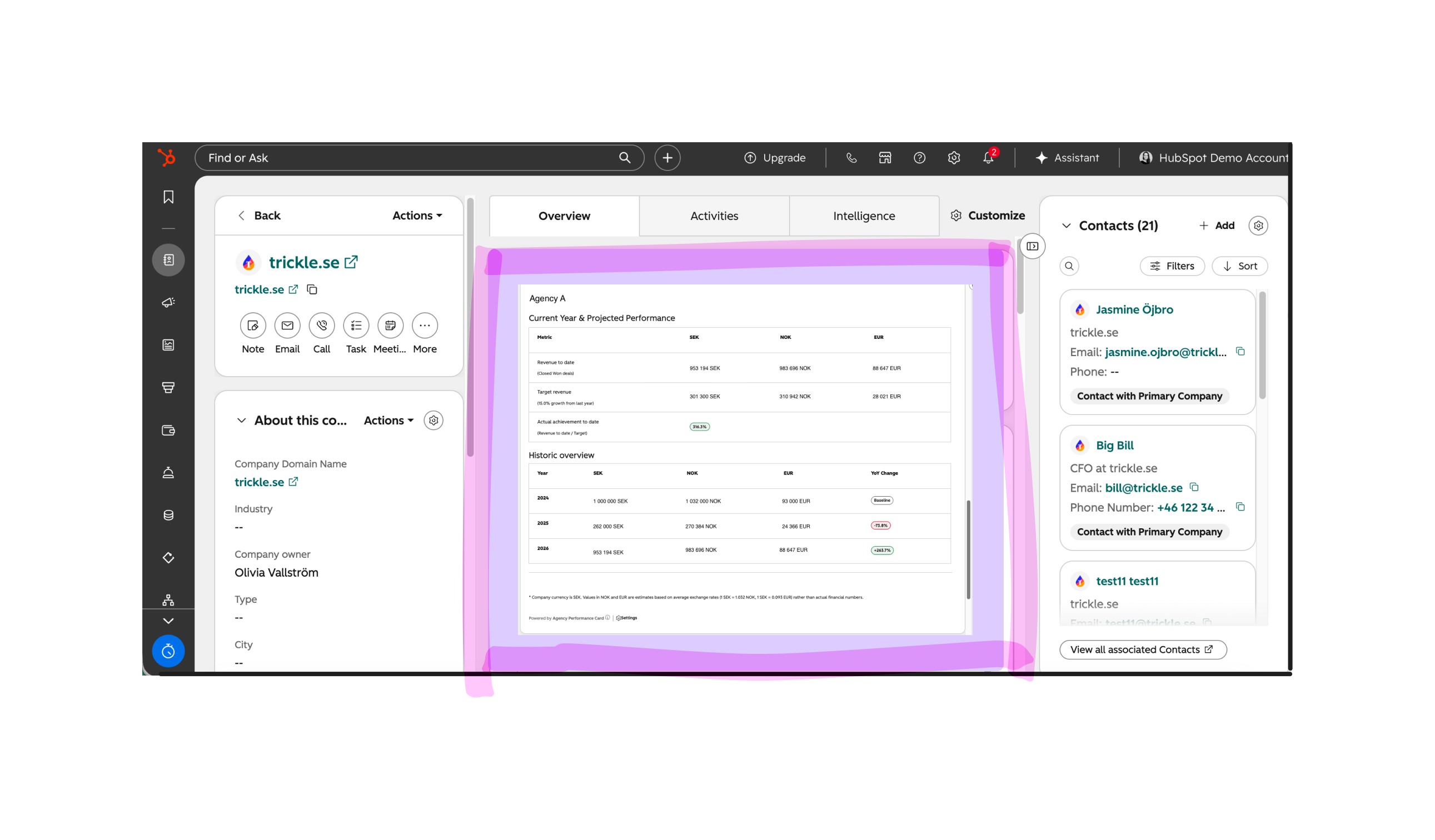
To surface information cleanly for users I set out to build (by prompting an LLM) a card on the company record that shows the current year & projected performance and historic overview.
Solution design
Here we have the following components:
- The custom object for Revenue Snapshot with its properties
- The custom object for retainers (properties pending)
- A n8n automation to handle the search, create, associate side of things
- A private app to trigger webhooks to n8n when a deal is updated
- A custom card for Companies that presents the data in a easy-to-view way, filtered to only show to users with access to the agency data they should see
- HubSpot workflow automations to:
- Add the previous snapshot ID into a propety for it
- Update the current and previous snapshot ID when the name of the associated company changes
- Calculate the value for Last year’s revenue (Sidenote As an alternative, this can be a rollup property based on association labels)
The Revenue Snapshot and properties
The information I’d need to collect on the revenue snapshots would be:
- Information for the naming convention to be handled via HubSpot workflows: Agency, year, company name
- What the revenue to date is (calculated on the amount of all associated deals)
- A property to set the Growth target which would then calculate the Target Revenue and Target achievement using the information of Last year’s revenue and the Revenue to date
- Properties to identify the current snapshot ID and the preceeding snapshot (preceeding year with revenue data)
- A filter function to only allow agencies access to their own revenue snapshots - set by Shared team (Shared team = Agency A in combination with permission settings means Agency B can’t see these)
A note on retainers - out of scope but prepared for
The agencies work with clients on a project or retainer basis. Retainer contracts differ between them, but most are on a 30-day (end of month) rolling contract. This has historically been handled by adding deals to cover specific periods and then manually adding the deal for the next retainer period.
A separate project is planned to automate this. Similar to financial records, it will have a record per retainer, with deals that are in the pipline associated to them.
I decide to prepare for this additional information for the company card to handle calculations on projected growth. The retainer has a value which is shown as part of the projected revenue, but will subtract any closed won deals that are associated to the retainer record and the revenue snapshot and instead then show as revenue to date.
The card hides this information if no retainer record is associated to the company.
The n8n automation
Yes, this can be handled inside HubSpot if you have access to Custom Code Actions, which this portal does not. n8n to the rescue.
The flow, as it currently stands (updated each time I spot a systematic error) is:

The sections, in order do the following:
- Webhook trigger
- Splits out the data in case the webhook is triggered by more than one change on the same deal
- A router that keeps if the trigger corresponds to…
dealstagewas changedcompany_namewas updatedclosedatechangedpipelinechanged
- Merge data streams and get complete deal information and only keep if deal stage is set to closed won
- Get information to search for snapshot record
- If there is an associated snapshot: check if the deal is associated to the correct snapshot and remove the snapshot if incorrect. Join to main branch
- If there is no associated snapshot: search if a matching snapshot exists.
- If snapshot exists: associate to deal
- If no snapshot exists: create new snapshot, associate to deal, company and preceeding/following snapshots
In order to trigger this on a custom object, I set up an app in HubSpot with a webhook that triggers the n8n flow. Had the webhook been sent via a custom code action or webhook action, you can pre-filter and decide what data goes out. This trigger on all changes, so it’s necessary to have the filters at the start to rule out firing for incorrect things.
I’ve outlined the solution I used to trigger the webhook in this article: Connecting n8n and HubSpot: Setting up a webhook trigger through an app and adding credentials for HTTP requests using an oAuth app
The company card
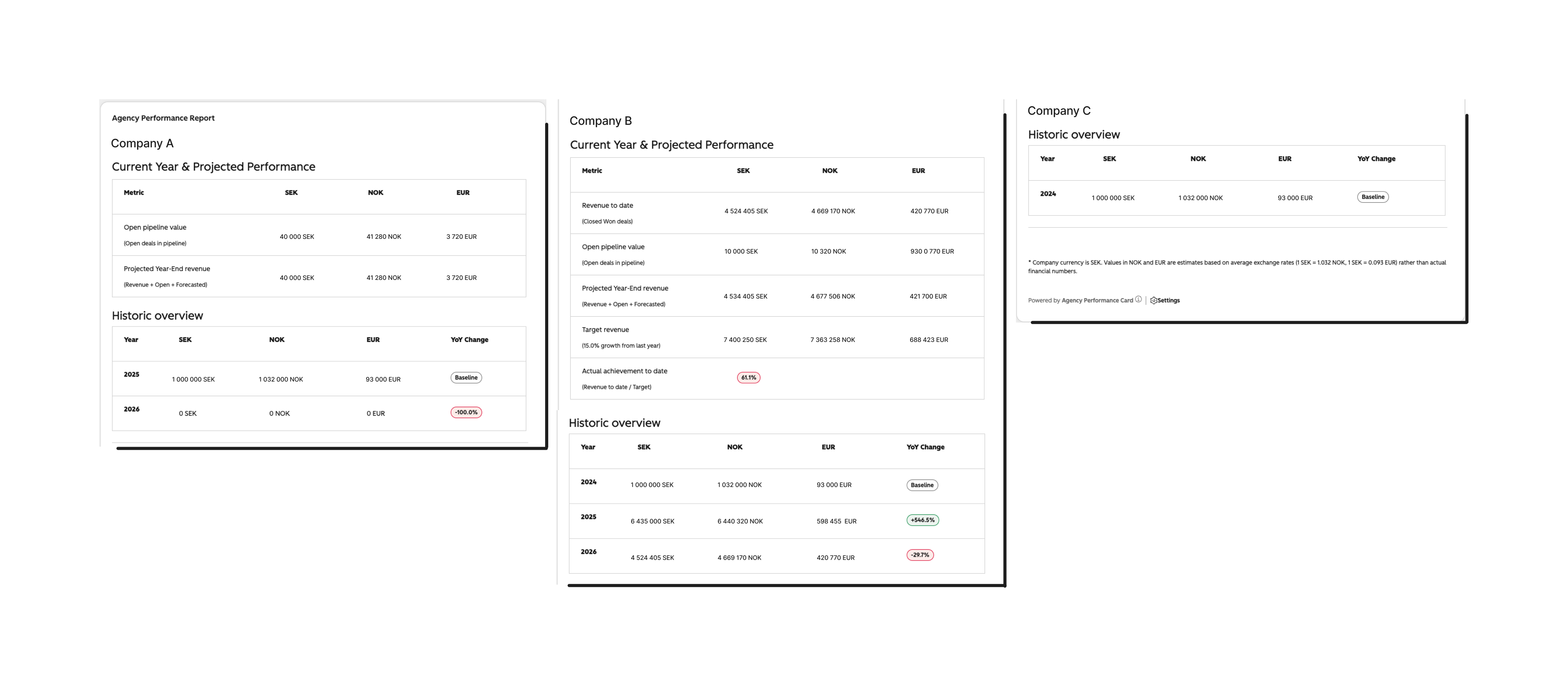
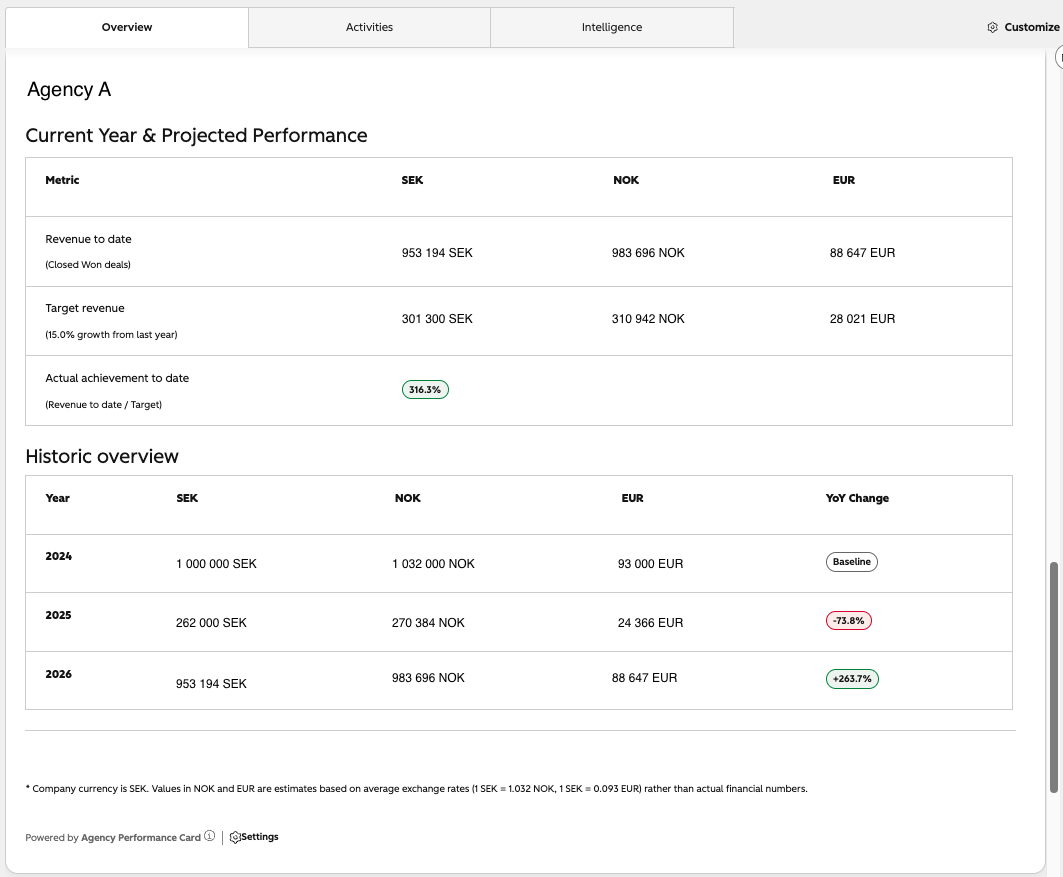
This is a private app with two layers. One is the Company card (a custom card) that displays the data in the UI. The other is a function to fetch the data and perform calculations, and pass these on to the card to be displayed.
What I’ve incorporated:
- Filters. The function does a lookup to match the user to their team and permisison set to hide/show information from the revenue snapshots and pipelines.
- Hide/show parts of the report depending on what data is known. If no retainer record is associated, it hides info related to this.
- Calculations of YoY change and achievements
- Open pipeline value for just open deals in pipeline
- Calculate the projected year-end revenue based on the closed won deals, the open pipeline value and forecasted information (from the yearly value of retainers, if known, excluding amount already in closed won)
- Calculations of deal amounts for the x3 currencies in use (some users are based in other countries), anchored in the company currency SEK
Learnings and reflections
- Don’t overcomplicate things! I really wanted to have a serverless solution to manage the revenue snapshots creation and retainer records (because it felt complex, cool and like a technical challenge), but it was not suitable as a solution. I shed all but the core functionality and offloaded to n8n, workflows and split the bulk of the retainer object work for a future project. Lesson learned!
- I’ve not figured out how to use the developer testing from the HubSpot CLI so have to upload and deploy the app each time I make a substantial change to see the effects in the UI. This is an area I need to explore further.
- This has been a crash course in n8n and error handling and I’m still working at improving the automation and logic in the flow.
- Evne if you’re not visually showing any error handling for custom cards, it’s key to add console log output so you can debug more easily when something does go not according to plan.
- Really breaking down the flow into separate steps make it easier to plan out the solution and see what needs code and what can be offloaded to something that already exists (eg. workflows native actions).