Building cross-sell enablement in HubSpot using Breeze agents and serverless functions
Project background
I’m a super admin in a lovely multi-brand company group portal (that’s a mouthful!). There are five sister-companies under the same corporate umbrella, as well as the parent-company itself hosted inside the same HubSpot portal.
The companies share contact and company records, but shield company-specific properties from each other and only have access to view & edit their own teams’ deal and lead pipelines.
One of the main reasons to smash all sales and marketing operations into one portal was to be able to work better with identifying cross-sell opportunities and avoid stepping on anyones toes at critical points in time. We want to avoid Organisation A from pitching to a company that’s already in talks with Organisation B. Furthermore, if an active client relationship is ongoing it makes sense to send out feelers to the other organisation before clomping onto the scene.
What I’m building
The goal is to have a visual card on the company record that displays three pices of information:
- The customer status - has anyone worked with them in the past, or is currently working with them? - We want to avoid trampling on any toes or swooping in to pitch services at a delicate time in the relationship.
- Status of pitches across the internal company - to allow someone to easily see: is there already an ongoing conversation I can get in on?
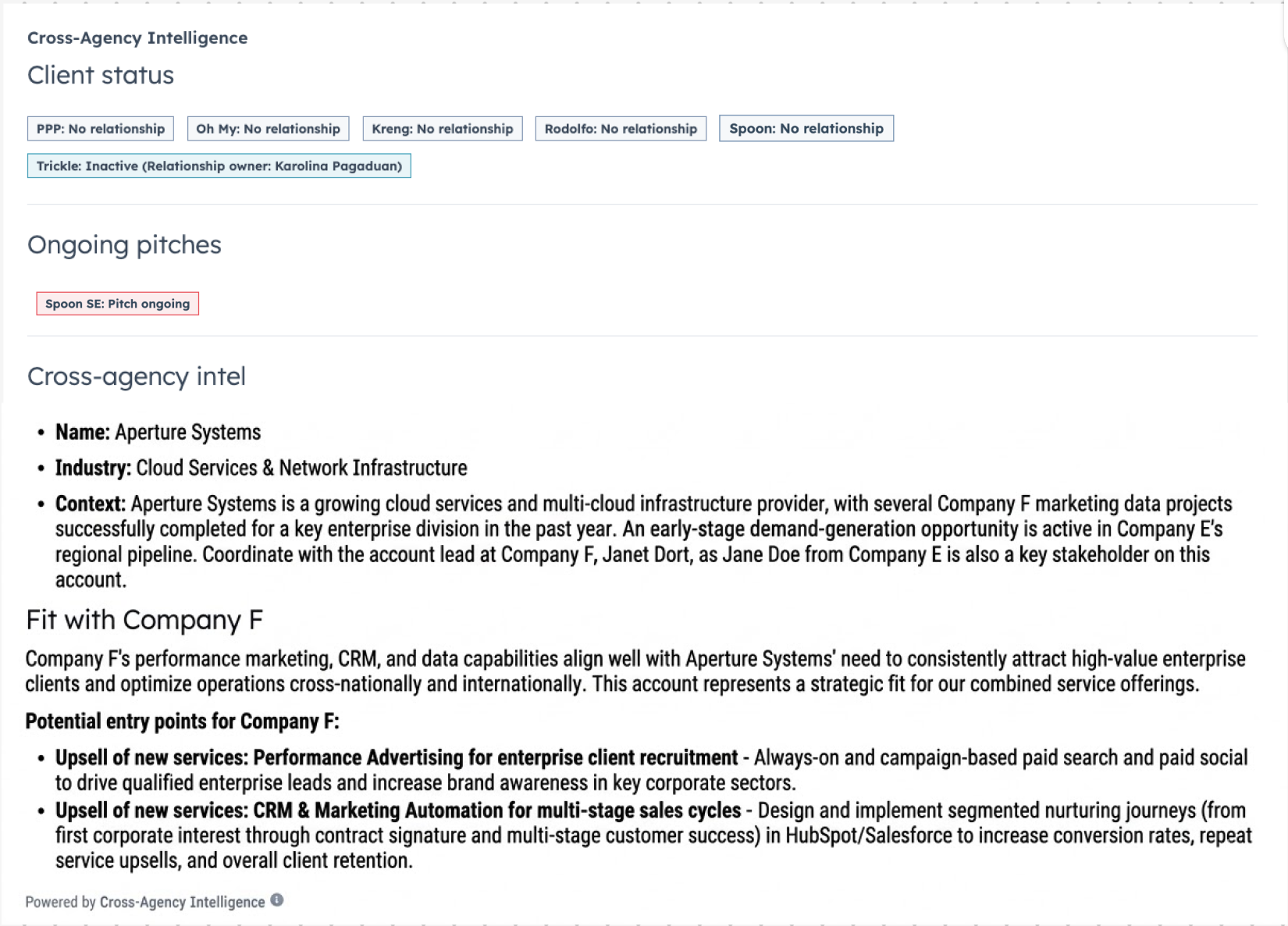
- Intel on identified upsell and cross-sell opporturtunities based on info collected by other companies - is this business a good fit to ping a colleague about, or enquie to the internal main point of contact myself?
For this build, I’m working with several components.
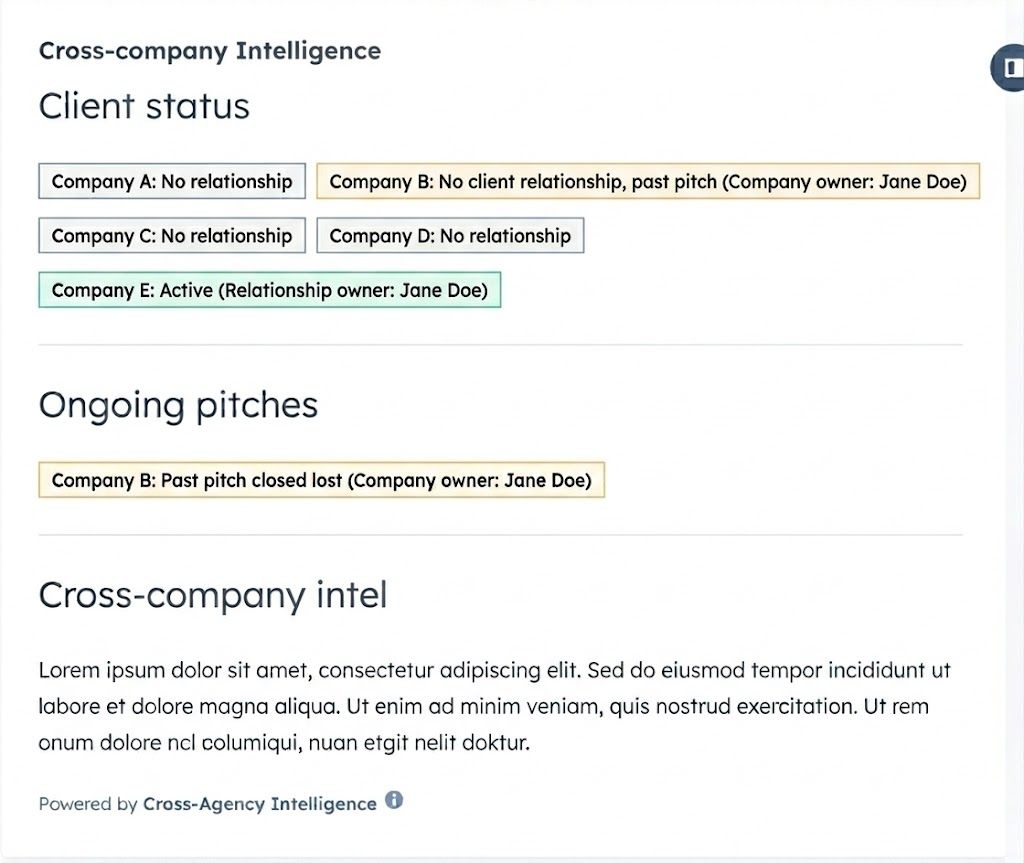
Customer status
Thanks to my colleaggue who build out the foundation int his portal we have three lovely propertiy groups to work with:
- Organisation owner - instead of fighting over who holds copmany owner status, each organisation simply has their own owner property to internally update and manage.
- Project status - if the client has no relationship (empty value), has had a project with us in the past (inactive) or is currently engaged with our services (active); this is updated via workflows.
- Project end date - when a deal is closed won, the deal owner adds in the expected start and end dates for the engagement. This is carried across to the company record, and switches the client status to active/inactive based on if the end date is in the past or future.
Each of these properties has one version per organisaton, meaning we can get really granular in telling what the status is across the full business.
Users can view this information by looking at the properites panel, but have expressed that it’s not intuitive, so I’m including it in the visual overview while I’m surfacing other information (meaning I can also clean up the cluttered company card view).
I want to show the organisation name, the status (no relationship / active / inactive), and the name of the point of contact for our internal organisation to reach out to to discuss opportunities for cross-sell or get more client context.
I’m interested in throwing in some colour-coding:
- Green - Active relationship
- Blue - Inactive relationship
- Grey - No relationship
- Amber - No relationship, but has been pitched to in the past
Pitch status
Each organisations deal pipeline is only accessible to users that are members of that team. Organisation A cannot see the pipeline or individual deals of organisation B. This has led to some awkward situations in the past where two organisations with similar services find themselves pitching against each other when they could combine forces. We also want to avoid someone coming in cold where there is a discussion happening.
Here the aim is to surface information from the organisations’ deal pipelines.
If they are an active client, no informaton needs to be shown. If they are a past client, it should flag if they are again in an active pitch phase (hide closed won/lost). If there is no relationship, show ongoing pitches (deal in any deal stage), at the same time highlight if there is a past pitch with the satus closed lost.
Similar to the client status, it should include the name of the deal owner to reach out to for more context.
The filtering should be done based on latest create date, in case someone edits a closed lost deal and the visual looks at that information and misses out on an ongoing, open deal.
Similar here, I’m using colour coding on the tags:
- Red - Means there is an active pitch happening, don’t approach without checking with the point of contact first
- Amber - Past closed lost pitch, meaning there is history and context to get from the deal owner, but free to approach
Cross-sell intelligence
I’ve set up a rich text field property for cross_company_fit_intel.
I’ll use a Breeze agent to view and analyse available information on the company record and related assets (search contacts and deals for more context). It will look at a knowledge vault for exact GTM information on the organisations’ ICP, buyer personas, services, triggers and use case examples (case studies).
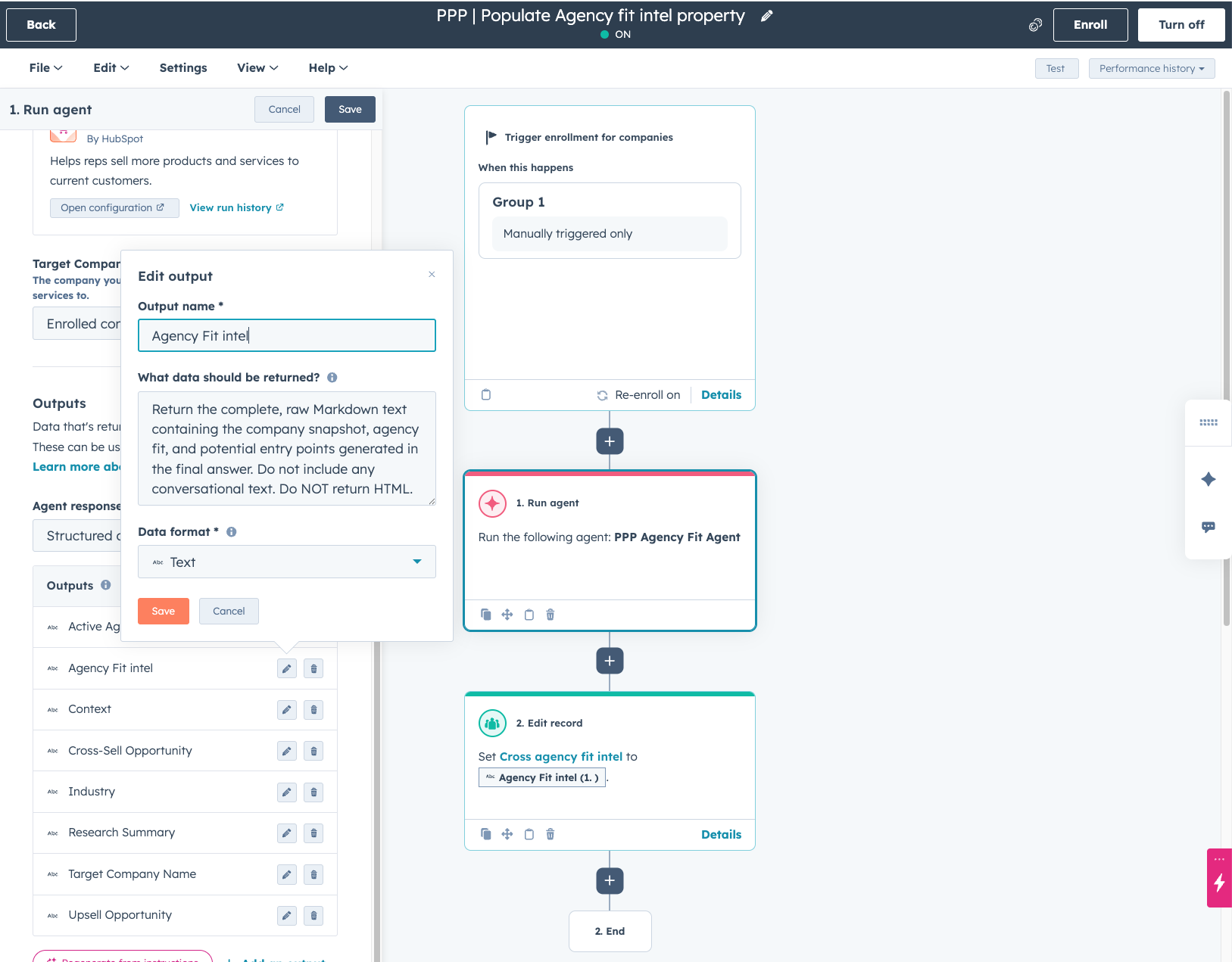
At the time of writing, HubSpot just released a function to enroll a record via a workflow, send to an agent, and then use the agent output. This is what I’ll use to populate the property in question.
The todos on this section are:
- Set up the property and workflow to have it populated
- Configure a Breeze agent to do the analysis and output
- In the build of the card make sure it renders the output nicely
Building the agent
I couldn’t find a way to set up an agent from scratch, so I installed HubSpot’s cross-sell agent as a baseline and edited that.
Knowledge Vault
The Agent uses portals settngs for things like the ICP, buyer personas and company value proposition to do it’s analysis. A bit tricky in my opinion to maintain with the mix of companies, so I opted to set up a Knowledge Vault with markdown files that has simple outline of each agency’s GTM:
- Company URL
- Core offerings which is a list consisting of a title of the service with a definition of the scope/clarification of what it is
- Target buyer and persona triggers - example job titles, pain points, action triggers and best-fit service(s)
- Case studies for key services that states the service, the problem, the solution & result, the triger match and a link to the case study
For a MVP, this has worked nicely and I think there is plenty of room for improvement here.
Agent settings
The core settings are locked, but there is an area to add extra set of instructions to make sure it looks in the right place for the information I want it to base insights on.
For the setup, I changed:
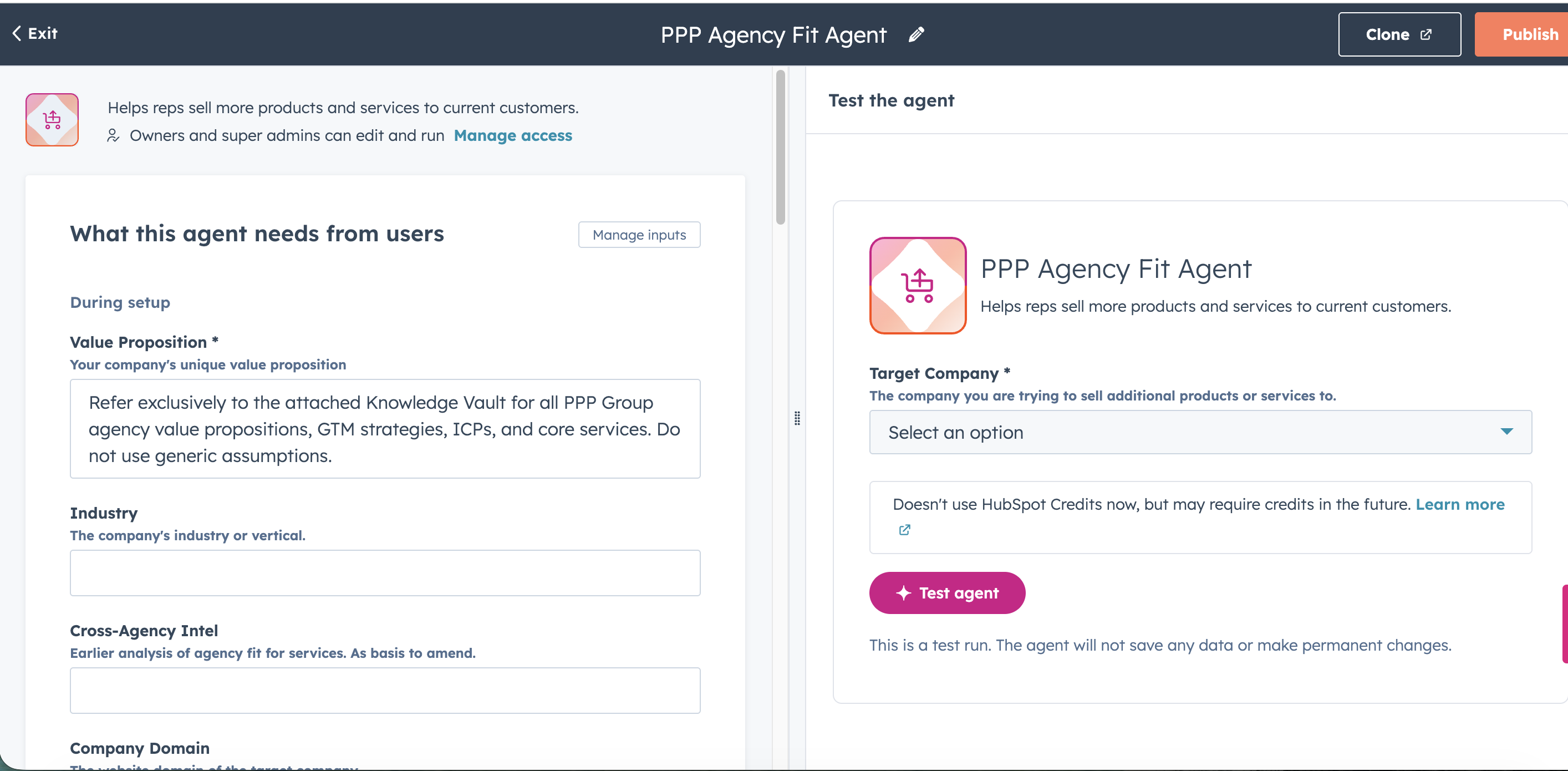
- The what this agent needs from users added or changed the fields for:
- Value proposition was mandatory, so I added a note on checking the Knowledge vault
- Industry - The company’s industry or vertical.
- Company domain - The website domain of the target company
- Cross-Agency Intel - Earlier analysis of agency fit for services. As basis to amend.
- The Extra instructions field with rules on:
- Critical system override - to adhere to the core agent instructions but follow the following ruleset
- Knowledge search - Specify to check the Knowledge Vault
- Active research & deal analysis - Handling situations where company domain is missing, how ongoing pitches are defined, rules on looking at associated objects eg. get details on closed lost reason (to avoid suggesting services that have already been pitched and not won)
- Output format - To ensure markdown formatting, and guidance on how to present the insights
- The What this agent can do section to add research company web page and research company news
- Changed the What this agent knows and removed all presets, and added a specific Knowledge Vault
Workflow configurations
For my test, I had a manual enrollment of a company record and a step to send the record to the Agent, followed by a Edit record step to use the Agent output to add to the property. I layered in another rule for ensuring markdown formatting.
The triggers will be changed to enroll records periodically:
- 45 days after the start of a new client relationship (from no relationship/inactive to active) to allow further collection of context-rich data from meetings, notes and emails
- On a quarterly cycle for existing clients
Building the card
I started off building the card, made it work for the client status and ongoing pitches section, and then worked on it again after getting the agent set up and working.
For this build, I essentially had to:
- Set up a React card - this will be the visual output that can be added to the Company record view
- Create a file for serverless function that would do the backend of querying the API to get information for the frontend.
- Ensure proper filtering of the info coming from the serverless function for the client and pitch status, and the rendering of the property being pulled through and the format displayed correctly
To ensure a smooth build, I also needed to gather the internal IDs for the deal pipelines, deal stages and different properties for the status, owners and dates.
Since I was using Gemini for this project, I fed it the backend details and made sure it included it in the mapping and added helpful “human” labels so I could later identify the numerous number strings used to identify pipelines and stages.
Serverless support not available on dev plattform 2025.2
The latest developer platform at the time of writing is 2025.2 which does not support serverless functions and I had to set up the project on the earlier version 2025.1 to make it function fully in HubSpot (otherwise the serverless bit had to be hosted on a 3rd party platform).
The coming 2025.3 version will apparently have serverless function support, so I have a migration to look forward to.
Pre-filter to not overload when fetching deals
By filtering out not fetching information from pipelines where there is an active relationship, it helped make sure not to overwhelm the process. However, for some companies there were well over 200+ deals in different states, for just one pipeline. It caused a failure to load anything onto the card as it hit a “wall” in how much data could be fetched due to API limits (100 records).
The serverless function needed to be rewriten to:
- Fetch the deals associated with the company by querying the HubSpot API
- Check the response and look for
paging.next.afterwhich is a token that basically says “there are more deals on the next page - The function gets the first set of deals, and then comes back for the next batch of deals; looping through fetching and adding to an array (list) until it can’t find another token for the
paging.next.after - The function grabs the full array and sends to the frontend (the React card) to then filter and use the information.
Phonebook solution to map Owner and User
The Owner property assigns a specific portal user to an intenal ID string. To show this string of numbers visually is easy, but to show the label, the name of the owner that belongs to that ID, is not quite as straight-forward.
The React card gets served the internal values, so in order for any tags or information to display a label like the company name we need to explicitly map this in the code. For the users, that is not maintainable as we’d have difficulties keeping it up-to-date as new people join the organisation.
In HubSpot, the value of the owner property is connected to the user profiles. For the serverless function, this means it fetches the user and owner data and map those together into a dictionary of sorts, and then when the frontend pulls in the information it can quickly grab the label for the ID strings of the Company and Deal owners to display.
Rendering the rich text output
I assumed I’d be able to get the agent to add HTML into the rich text field and then have then pull into the card to have a nice, clean display. Apparently there is a safeguard in place that will strip anything using brackets <> to make sure it’s not malicious code, so HubSpot will turn them into plain text instead of the expected rendered HTML output.
To circumvent this, I switched to getting the Agent to product it’s insights as pure markdown formatting. Instead of tagging headlines using brackets like <h2>My headline</h2> it uses ## My headline.
The frontend then has a set of translation instructions to know that the markdown formatting should be rendered as headlines, bold text or bullet points in a list. The method wasn’t flawless, and I had to make several passes at it to make sure it picked up “broken” text elements like & being rendered as & and bold text inside a bullet point. The translation basically looks at text symbols, checks the list of rules and then outputs a specific visual based on that.
Project learnings
To not bore you with exact details of when/how I came across this, some learnings are:
Include very precise consolse log error output
Since I’m not a developer, I’m using Gemini CLI (+ web version in paralell). For it to understand what is going on, making sure it sets up a detailer console log for any serverless functions and includes status messages on the React card is helpful. You can feed the output to the CLI and/or show sceenshots to the web version for it (and myself on a few rare occasions) to more easily pinpoint what the error is.
Once I got past a hurdle it tended to remove the detailed console log output for success or failure, so I had to include in each prompt to leave it untouched.
Gemini can and will get stuck in a reasoning loop
I had about 30 version that kept circling back to the same tried and failed solution for getting the owner names on the tags (and then again later to solve the text conundrum). The only way to break free was to switch to web browser, introduce screenshots of the full screen which made it pick out new details to fixate on and approach the problem from a different angle, and to repeatedly tell it to go search HubSpot community forum, Reddit, StackOverflow or similar developer-hangouts for people explaining similar situations.
Next steps
This is now a solid minimal viable product which displays key data, doesn’t crash on first load and displays some insights. I can see that the main areas of improvements will be to modify and refine the Agent output, to make sure it correctly identifies and matches the businesses with opportunities. I think that a similar solution couuld be build out and rolled out on client accounts with less time and effort than was needed here (provided that most of the building blocks are in place of course).